In a previous post I
showed how to trigger a semantic model refresh from a Fabric notebook
using sempy.fabric. That approach works great for small models, but
in production you’ll quickly run into problems when the model has many
tables or large fact tables.
The problem: out of memory
The sempy default for max_parallelism is 10. For a model with
27 tables including several large fact tables (tens of millions of
rows), processing 10 tables concurrently can easily exhaust the
available memory on the capacity and the refresh fails with a generic
“out of memory” error — or worse, it succeeds but takes an
unreasonably long time because of internal retries.
The fix is to use the Enhanced Refresh API parameters that sempy
exposes natively:
max_parallelism=1— process one table at a timecommit_mode="partialBatch"— commit each table individually so a failure doesn’t roll back everythingretry_count=1— one retry on transient failures
The notebook
import sempy.fabric as fabric
import time

# Resolve workspace (adapt to your naming convention)
workspace = fabric.resolve_workspace_name()

# Datasets to refresh
datasets = ["SemanticModel_A", "SemanticModel_B"]

TERMINAL_STATUSES = {"Completed", "Failed", "Cancelled", "Disabled", "TimedOut"}

for dataset_name in datasets:
    # Get table list programmatically from the semantic model
    tables_df = fabric.list_tables(dataset=dataset_name, workspace=workspace)
    tables = tables_df["Name"].tolist()
    objects = [{"table": t} for t in tables]

    print(f"Refreshing: {dataset_name} ({len(tables)} tables, maxParallelism=1)")

    refresh_request_id = fabric.refresh_dataset(
        workspace=workspace,
        dataset=dataset_name,
        refresh_type="full",
        max_parallelism=1,
        commit_mode="partialBatch",
        retry_count=1,
        apply_refresh_policy=False,
        objects=objects
    )

    # Poll for completion (1-hour timeout, 15s interval)
    timeout_seconds = 60 * 60
    start_time = time.time()
    last_status = None

    while True:
        if time.time() - start_time > timeout_seconds:
            raise TimeoutError(
                f"Timed out waiting for {dataset_name} refresh "
                f"(request_id: {refresh_request_id})"
            )
        time.sleep(15)

        res = fabric.get_refresh_execution_details(
            dataset=dataset_name,
            workspace=workspace,
            refresh_request_id=refresh_request_id
        )

        status = getattr(res, "status", None)
        if status != last_status:
            print(f"  [{time.strftime('%H:%M:%S')}] {status}")
            last_status = status

        if status in TERMINAL_STATUSES:
            break

    if res.status == "Completed":
        print(f"  ✓ {dataset_name} refresh completed")
    else:
        errors = res.messages["Message"].str.cat(sep="\n")
        raise Exception(f"Refresh for {dataset_name} failed:\n{errors}")
Tip: This notebook can run in a pure Python kernel — there’s no Spark dependency. You don’t need to spin up a Spark pool for a REST API call. This significantly reduces CU consumption, especially on lower SKUs where every CU-second counts. See the official documentation for more details, or Jason Romans’ talk at FabCon.
Why this is better
No hardcoded table lists
fabric.list_tables() discovers the tables at runtime. When you add a
new table to the semantic model, the refresh picks it up automatically.
No notebook update needed.
partialBatch commit mode
The default transactional mode runs the entire refresh as a single
unit — if any table fails, everything rolls back. partialBatch splits
the refresh into three separate phases:
- ClearValues — clears all table data (reduces memory to ~0)
- DataOnly — loads data into each table (one transaction per table
when
max_parallelism=1) - Calculate — builds calculated columns, measures, relationships
This has two important benefits:
- Lower peak memory: splitting
FullintoDataOnly+Calculatereduces the memory spike compared to doing it all in one step. - Less rework on retry: with
max_parallelism=1, if table 3 fails andretry_count=1triggers a retry, tables 1 and 2 are not re-refreshed — only the failed table is retried.
The trade-off: the model is not queryable during the refresh (data is cleared in phase 1), and the overall refresh is slightly slower due to the three separate passes.
See Chris Webb’s detailed
analysis
of partialBatch behaviour with Profiler traces.
max_parallelism=1
The sempy default is 10. That means 10 tables loading data into
memory simultaneously. On an F8 with 3 GB to share, that’s a recipe
for disaster. Setting it to 1 doesn’t guarantee success — a single
table that’s too large will still OOM — but it eliminates the most
common failure mode: several medium-sized tables collectively
exhausting the capacity.
Know your SKU
Microsoft caps both memory and refresh parallelism per SKU:
| SKU | Max memory | Max refresh parallelism |
|---|---|---|
| F2 | 3 GB | 1 |
| F4 | 3 GB | 2 |
| F8 | 3 GB | 5 |
| F16 | 5 GB | 10 |
| F32 | 10 GB | 20 |
| F64 | 25 GB | 40 |
| F128 | 50 GB | 80 |
Source: Semantic model SKU limitation
The service won’t protect you from OOM — it will attempt the parallel
refresh and fail if the combined memory footprint exceeds what’s
available. Know your SKU and set max_parallelism accordingly.
Complementary strategy: incremental refresh
Reducing parallelism helps, but the most effective way to avoid OOM on lower SKUs is to reduce the amount of data being refreshed in the first place. That’s where incremental refresh comes in.
If your fact tables have a natural date column (invoice date, transaction date, snapshot date), configure an incremental refresh policy in Power BI Desktop. The service will:
- Partition the table by date ranges
- Only refresh the recent partitions (e.g. last 2 days)
- Keep historical partitions as-is
- Optionally add a DirectQuery real-time partition for the latest data
This means a 50-million-row fact table might only refresh 100K rows per
cycle instead of the full 50M. Combined with max_parallelism=1 and
partialBatch, you get both less memory per table and less
total memory across the refresh.
In the notebook, you’d switch from refresh_type="full" with
apply_refresh_policy=False to refresh_type="automatic" with
apply_refresh_policy=True, which lets the service apply the
incremental refresh policy you defined in Power BI Desktop. The enhanced
refresh parameters still apply — partialBatch and max_parallelism
work with incremental refresh too.
| Strategy | Effect |
|---|---|
| Incremental refresh | Less data per table (only recent partitions) |
max_parallelism=1 | Less concurrent memory pressure |
commit_mode="partialBatch" | No full rollback on failure |
Use all three together for the most reliable refresh on F2–F32 capacities.
Data Factory as an alternative
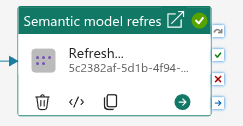
If you’re not using a notebook-based orchestration, Fabric Data Factory
also offers a Semantic Model Refresh
activity
that exposes the same enhanced refresh parameters (maxParallelism,
commitMode, retryCount, table selection) through a visual UI. It
supports “wait on completion” natively, so you can sequence multiple
model refreshes in a pipeline without writing any polling code.
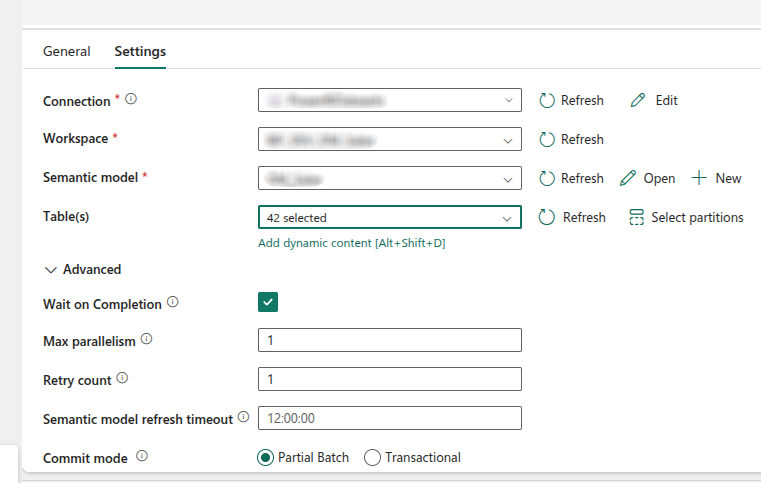
This is the simpler option if your orchestration is already in a data
pipeline. You get the same partialBatch + maxParallelism=1 benefits
with zero code.
When to use the notebook approach
The notebook approach is a natural fit when your pipeline follows the
standard layered pattern: raw → transform → load → refresh. A Master
notebook orchestrates the stages via notebookutils.notebook.runMultiple,
and the semantic model refresh is simply the last step in the DAG —
it runs after all the data has been loaded into the target tables.
In this pattern, the refresh is not a separate pipeline activity —
it’s a notebook cell that inherits the Fabric runtime context. Using
sempy.fabric directly keeps everything in one place: same auth,
same workspace resolution, same error handling. No need to spin up a
separate data pipeline just to call a REST API.
The two approaches are complementary:
| Orchestration | Refresh method | Why |
|---|---|---|
| Data Factory pipeline | Semantic Model Refresh activity | Visual, no code, built-in wait |
runMultiple DAG | sempy.fabric.refresh_dataset in a notebook | Same runtime, same auth, no extra pipeline |
Conclusion
The Enhanced Refresh parameters have been available in the Power BI
REST API for a while, but sempy makes them a one-liner in a notebook.
By combining partialBatch, a sensible max_parallelism for your SKU,
and (where applicable) incremental refresh policies, you get a refresh
that’s resilient to transient failures, memory-bounded, and only
reprocesses what changed.
None of this requires leaving the notebook. The same code works whether you’re on an F4 dev capacity or an F256 production box — you just tune the parallelism to match.
Have fun!